Expenses in seconds
Add from Control Center, a widget or Siri. Set up Apple Pay once and purchases log themselves.
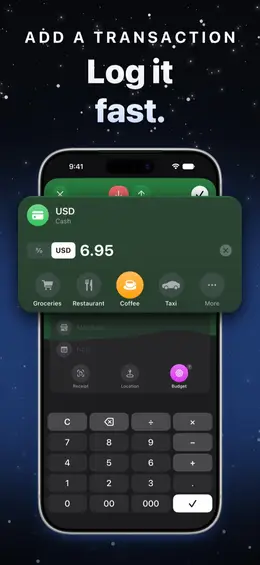
Your net worth, budgets and goals in one place. Log a purchase in seconds — or let Apple Pay log it for you.

Add from Control Center, a widget or Siri. Set up Apple Pay once and purchases log themselves.
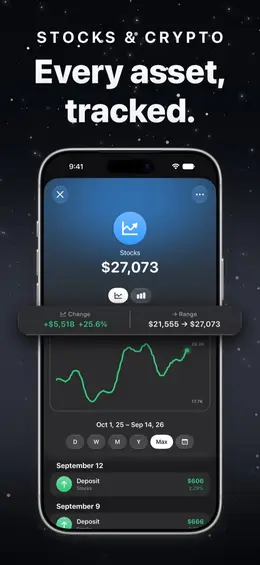
Cash, accounts, stocks, crypto, property and debts — your true net worth at a glance.
Weekly, monthly or custom budgets with alerts, and savings goals with deadlines.
Salary, rent and subscriptions on autopilot — from daily to yearly.
Stocks, ETFs, crypto and metals at market prices, with gain, loss and cost basis.
Scan receipts, keep them with purchases, and see on a map where your money goes.
Accounts, transactions, receipts and places live on your devices and in your own iCloud. There is no server of ours that holds your finances.
Yahoo Finance gets the tickers and currencies you track, and Financial Modeling Prep the tickers whose logos you see. Never your balances or amounts.
Sign in with nothing. No advertising, no tracking across apps, no generative AI reading your data. Crash reports and usage statistics are anonymous and carry nothing you entered.
No. There is no sign-up and no server holding your finances. Your data lives on your devices and in your own iCloud.
Yes. With iCloud on, everything syncs to every device on the same Apple Account, receipts and goal photos included. Settings › About shows when it last synced.
Free gives you two accounts of any kind, one budget, one goal and two recurring transactions, with transactions, Insights, widgets, Siri, Apple Pay automation and sync. If you installed before the free plan changed, you keep five accounts, two of them with tickers. PRO removes the limits and adds receipt scanning, percentage transactions, custom icons, goal photos, the currency chart, header backgrounds and routes on the map.
Yes, on iPhone. Settings › Transaction Automation walks you through a Shortcuts automation that logs every Apple Pay tap at a terminal, with its amount, merchant and place. You can also log an expense with the Action button or Back Tap.
Yes. Settings › About › Export Transactions (CSV) creates a spreadsheet, and Back Up All Data saves everything to a single file you can restore later.

Budget & expenses app. Free on the App Store.
Download on the App Store (opens in a new tab)